QAOA / Constrained QAOA
QAOA (Quantum Approximate Optimization Algorithm) is a quantum-classical hybrid algorithm that alternates between quantum circuit operations on a quantum computer and classical optimization. It can solve optimization problems whose objective function is an \(N\)-th degree polynomial in Ising variables.
To use QAOA, specify QAOA as the algorithm when constructing a quantum computer client. This page covers how to configure QAOA parameters and retrieve detailed results, and make practical use of them.
For algorithm details, see QAOA Algorithm and Constrained QAOA Algorithm.
The following example runs QAOA using QulacsClient and retrieves the execution results:
from amplify import QAOA, QulacsClient, VariableGenerator, Model, equal_to, solve

# Generate an array of decision variables
gen = VariableGenerator()
q = gen.array("Binary", 5)

# Create objective function and constraint
objective = q[0] * q[1] - q[2]
constraint = equal_to(q[0] + q[1] + q[2], 1)

# Define the model
model = Model(objective, constraint)

client = QulacsClient(QAOA)
result = solve(model, client)
Evaluating Execution Results
For quantum computer solvers, the solve() function returns an instance of the amplify.Result class. Its amplify.Result.response_time and amplify.Result.execution_time attributes correspond to the communication time and circuit execution time with the quantum computer (real device or simulator). They do not correspond to the solver service itself.
In QAOA, the quantum state is measured shots times to sample Ising sequences, and this is repeated across optimization steps. Therefore, amplify.Result.response_time and amplify.Result.execution_time represent the cumulative totals across all sampling rounds.
result = solve(model, client)

result.response_time      # Total communication time with QPU
result.execution_time     # Total execution time on QPU
The Ising sequence most frequently observed at the optimal parameters is a strong candidate for the optimal solution. However, the most frequently observed Ising sequence is not guaranteed to be optimal. Therefore, every Ising sequence sampled across all measurements during the optimization process is recorded. Among these, amplify.Result.best returns the Ising sequence that yields the smallest objective function value.
QAOA-Specific Results
The amplify.Result.client_result attribute has an algorithm-specific type that contains detailed solution results, including information about the execution process. For QAOA, the corresponding type is Result.
QAOA Result Attributes
Attribute |
Type |
Description |
|---|---|---|
Breakdown of execution time |
||
|
Total number of cost function evaluations (classical optimization iterations) |
|
|
Best cost function value \(C(\boldsymbol{\theta}^{\textup{opt}})\) found |
|
|
Best parameters \(\boldsymbol{\theta}^{\textup{opt}}\) found |
|
|
Measurement results at the best parameters: list of (Ising sequence, count) tuples |
|
|
History of each parameter optimization step |
QAOADurations (Execution Time Breakdown)
durations provides a breakdown of the time spent in each phase of QAOA.
d = result.client_result.durations

result.total_time            # Total time for amplify.solve
d.total_time                 # Total elapsed time for QAOA
d.total_response_time        # Total communication time with the backend
d.total_execution_time       # Total execution time on the backend
d.classical_processing_time  # Time spent on classical optimization (= total_time - total_response_time)
The following diagram illustrates the relationship between each metric during QAOA execution. Sampling on the quantum computer is performed at each classical optimization iteration, with a final measurement to extract the solution.
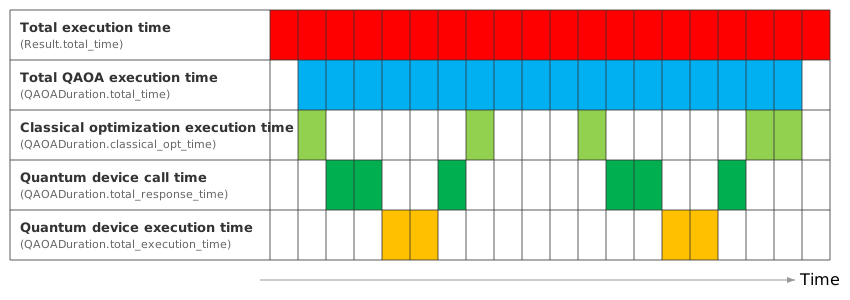
total_time: Total elapsed time including parameter optimization and final measurementtotal_response_time: Total time spent communicating with the quantum computer (real device or simulator) across all steps, including queue wait timetotal_execution_time: Total time the quantum computer (real device or simulator) was actually executing circuitsclassical_processing_time: Total time spent running the classical optimization algorithm (e.g., scipy.optimize.minimize), calculated astotal_time - total_response_time
history (QAOA Optimization History)
history is a list of each parameter optimization step (QAOAHistoryItem). One entry is added each time the classical optimizer evaluates the cost function.
for step in result.client_result.history:
    print(step.timestamp)           # Elapsed time from QAOA start to completion of this step
    print(step.parameters)          # Parameter values theta for this step
    print(step.objective)           # Cost function value C(theta)
    print(step.counts)              # Measurement results (Ising sequence, count)
    print(step.sampling_durations)   # Time spent on sampling
    print(step.sampling_meta)       # Backend-specific metadata
sampling_meta (Backend-Specific Metadata)
The contents of sampling_meta vary by backend.
- For Qiskit-based backends (AerClient / IBMClient):
meta = result.client_result.history[0].sampling_meta
meta.job_id     # Job ID
meta.circuit    # Executed Qiskit circuit object
For details on each client, see quantum computer clients.
optimized_counts (Measurement Results at Best Parameters)
optimized_counts contains the measurement results at the best parameters \(\boldsymbol{\theta}^{\textup{opt}}\). Each element is a tuple of (Ising sequence, count). Ising sequences with higher counts are stronger candidates for the optimal solution.
for ising_seq, freq in sorted(result.client_result.optimized_counts, key=lambda x: x[1], reverse=True):
    print(f"Ising sequence: {ising_seq}, Count: {freq}")
Converting optimized_counts Ising Sequences to Variables
The Ising sequences in optimized_counts are raw measurement values of internal qubits expressed as Ising values (\(\{-1, 1\}\)). You can convert them to the original variable array using the mapping from amplify.Result.intermediate.
result = solve(model, client)
sorted_counts = sorted(result.client_result.optimized_counts, key=lambda x: x[1], reverse=True)
for sol, freq in sorted_counts[:5]:
    values = q.substitute(
        {
            k: p.substitute(
                {v: sol[v.id] for v in result.intermediate.model.get_variables()}
            )
            for k, p in result.intermediate.mapping.items()
        }
    )
    print(f"Solution: {values}, Count: {freq}")
Distribution of optimized_counts and Optimization Quality
The distribution of optimized_counts serves as an indicator of how well the QAOA parameter optimization performed.
When results are concentrated on a few Ising sequences: The quantum state converged to specific solutions. This indicates successful optimization. The most frequent Ising sequence is a strong candidate for the optimal solution.
When results are spread across many Ising sequences: The quantum state is distributed over a wide state space, indicating insufficient optimization. Consider increasing the ansatz circuit depth, adjusting the classical optimizer, or changing the QAOA type.
bc = result.client_result.optimized_counts
total = sum(count for _, count in bc)
top_freq = max(count for _, count in bc)
print(f"Unique Ising sequences: {len(bc)} / {total} shots")
print(f"Most frequent Ising sequence count: {top_freq} ({100 * top_freq / total:.1f}%)")
Parameter Configuration
Parameters for the specified algorithm are configured via client.parameters. All parameters have default values, so the algorithm works without explicit configuration.
Parameter |
Type |
Default |
Description |
|---|---|---|---|
|
|
Ansatz circuit depth (number of layers \(p\)). Higher values increase expressiveness but deepen the circuit |
|
|
|
Number of measurements. Higher values improve statistical accuracy but increase execution time |
|
|
|
Cost function adjustment. Lower values place more weight on lower-energy solutions |
|
|
QAOA type. Changes the circuit structure and supported polynomial degree |
||
Classical optimization method. Defaults to scipy’s COBYLA |
QAOA performance is heavily influenced by the ansatz circuit configuration and classical optimization settings. The following sections explain the role of each parameter and tips for tuning them.
Ansatz Circuit Depth (reps)
reps specifies the number of layers \(p\) in the ansatz circuit.
Higher values increase the expressiveness of the quantum state, theoretically allowing the algorithm to approach better solutions.
However, deeper circuits increase the number of parameters proportionally to
reps, which also affects the convergence of classical optimization.On real hardware, deeper circuits are also more susceptible to noise.
Default:
10
- Example:
client.parameters.reps = 5
Number of Measurements (shots)
shots specifies the number of measurements performed at each parameter optimization step and during final solution extraction.
Higher values improve the estimation accuracy of the cost function, yielding more stable results.
However, they increase the execution time per optimization step and the cost of QPU usage.
Default:
1024
- Example:
client.parameters.shots = 2048
Cost Function Adjustment (alpha)
In QAOA, the objective function’s expectation value is typically computed from the sampled quantum states and used as the cost for classical minimization.
With the default \(\alpha = 1.0\), the expectation value is used as the cost, as before. Setting \(0 < \alpha < 1.0\) allows the Conditional Value-at-Risk (CVaR) to be used as the cost instead. [1]
With CVaR, the energy values obtained from measurements are sorted in ascending order, and the cost is the average of the lowest \(\text{ceil}(\alpha \times \text{shots})\) of them.
Therefore, at \(\alpha = 1.0\), CVaR reduces to the average over all measurement results, coinciding with the expectation value.
Decreasing \(\alpha\) places more weight on lower-energy samples, which can guide the optimization toward sampling good solutions more frequently.
However, decreasing \(\alpha\) also reduces the number of samples used to estimate the cost, so a larger shots value is needed to maintain estimation accuracy.
QAOA Type (qaoa_type)
qaoa_type specifies which QAOA ansatz variant to use.
QAOAType |
Accepted polynomial degree |
Description |
|---|---|---|
|
Ising: arbitrary degree |
Automatically selects between ORIGINAL and NHOT depending on whether constraints are present |
Ising: arbitrary degree |
Uses the standard QAOA ansatz |
|
Ising: arbitrary degree |
Uses an ansatz that accounts for N-HOT constraints (constraints where exactly \(n\) variables in an Ising variable sequence take the value \(-1\)) |
|
Ising: degree 2 |
Handles problems only up to quadratic degree for each corresponding QAOA variant |
Note
For types with the _QUADRATIC suffix, the Amplify SDK automatically reduces higher-order objective functions to quadratic or lower. This degree reduction may introduce auxiliary variables, increasing the number of qubits.
For algorithm details, see QAOA and Constrained QAOA.
- Example:
from amplify import QAOAType

client.parameters.qaoa_type = QAOAType.AUTO  # Default
Classical Optimization Method (minimize)
minimize specifies the classical optimization method used for parameter optimization. The default is ScipyMinimize.
ScipyMinimize
ScipyMinimize is an optimization method that wraps scipy.optimize.minimize. You can pass scipy.optimize.minimize parameters through the object’s properties.
For details on each parameter, see the SciPy documentation.
Parameter |
Type |
Default |
Description |
|---|---|---|---|
|
|
Classical optimization algorithm name |
|
|
|
Convergence tolerance. |
|
|
|
Initial parameter values. |
|
|
|
Additional options passed to scipy ( |
Tip
The choice of method depends on the problem and situation, but gradient-free "COBYLA" is commonly used for optimization on quantum computers.
- Example:
from amplify import ScipyMinimize

client.parameters.minimize.method = "COBYLA"     # Optimization algorithm
client.parameters.minimize.tol = None            # Convergence tolerance
client.parameters.minimize.x0 = None             # Initial parameter values (None for random)
client.parameters.minimize.options = {"maxiter": 100, "disp": True}
NoOpMinimize (Skip Optimization)
NoOpMinimize skips classical optimization and directly performs measurement with the specified parameters. Use this when you want to re-measure with already-optimized parameters. By reusing optimized parameters with an increased shots value, you can improve statistical accuracy.
- Example:
from amplify import NoOpMinimize

# First run: normal QAOA (parameter optimization + measurement)
result = solve(model, client)
best_params = result.client_result.optimized_parameters

# Second run: re-measure with optimized parameters (increased shots for better accuracy)
client.parameters.shots = 4096
client.parameters.minimize = NoOpMinimize(best_params)
result2 = solve(model, client)
In this case, result2.client_result.num_execution will be 1, confirming that only a single measurement was performed.